Construction Procurement Schedule: Definition and Template

What is a procurement schedule in construction?
A procurement schedule in construction ties each item or procurement package to a need-on-site date, a submittal date, and an order-by date, so materials arrive in step with the project schedule. It sits between the construction schedule, which says when work happens, and the purchase orders, which record what was bought.
The GC or construction manager usually owns the need-on-site dates, and the trade contractor's procurement manager owns the order-by dates. Most misses happen in the gap between them.
How do construction procurement methods affect the procurement schedule?
Your construction procurement method sets how complete the design documents are at contract award, and that determines how early you can submit and order.
Design bid build
Under a traditional contract, the gap between contract award and the day construction begins is often short, which squeezes long lead items.
Design and build contract
Because drawings are still changing when early orders go out, add a column for the drawing revision each order was priced against.
Construction management and management contracts
Each trade package carries its own award date, so plan for several schedule build-outs instead of one.
Long lead items vs. release-based buys on construction projects
Trade contractors need two kinds of rows because they buy two kinds of material.
Long lead items are the critical materials to review first every week. Most procurement schedule construction templates only have room for the left column.
How do you calculate the order-by date for each material?
The order-by date is the need-on-site date minus the vendor-confirmed lead time and a receiving buffer:
- Order-by date = need-on-site date minus (vendor-confirmed lead time + receiving buffer)
- Submittal-by date = order-by date minus (submittal review time + one resubmittal cycle)
Here's an illustrative example for one long lead item:
Check pricing before the PO goes out
If the leveled quote expires before the order-by date, get fresh pricing first. Associated Builders and Contractors reported that nonresidential construction input prices were up 7.4% year over year in April 2026. Re-confirm lead times in writing, too, when supply chain disruptions hit a category.
See how a field request becomes a coded PO with fresh pricing attached. Book a demo.
Construction procurement schedule template
Copy these columns into a spreadsheet, one row per item or procurement package.
For the spec section, use the CSI MasterFormat number from the project specifications.
Free download: construction procurement schedule template (Excel)
The columns most templates leave out, and the budget overruns they catch
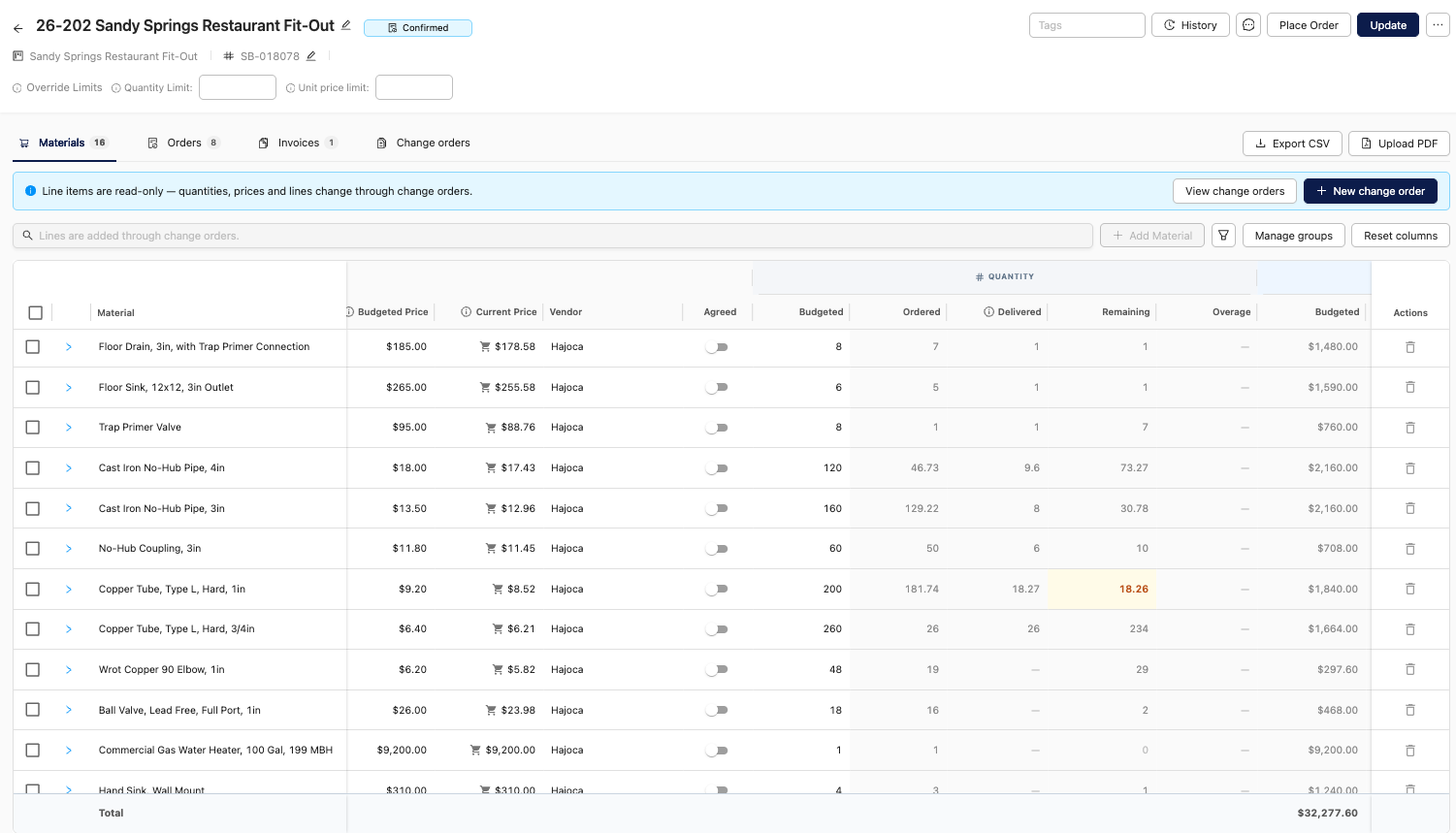
Four columns in this construction procurement schedule template do most of the cost control work:
Coding at the order is what makes the budget side work. As Vivian Jimenez, Controller at JGR Construction, put it: "We can budget, forecast, and evaluate things better because the orders are all there."
Why do procurement schedules drift and cause construction delays?
Procurement schedules drift because the planning columns get filled in once during preconstruction, while the actual dates live somewhere else:
- A PO confirmation in a project manager's inbox
- A revised ship date in a text from the vendor
- A delivery ticket on the floor of the office trailer
Nobody re-keys all of that every week, so a backordered line item reads as on track until the crew is waiting on it. These are the same failure points behind the most common construction procurement bottlenecks, and they're why material-driven project delays show up after the cheap fixes are gone.
When a procurement schedule falls apart mid-job, what's usually the first column that stopped being true, and who was supposed to update it?
“The first column that usually stops being true is the required-on-site date. A supplier's lead time or delivery commitment changes, but nobody updates the procurement schedule to reflect it. The supplier should communicate the change, but the teams needs to own keeping that information current and making sure the field teams are working from the same reality. Too often, everyone is looking at a schedule that’s already outdated, and the problem isn't discovered until the crew is waiting on material" - Eric Helitzer, LEED AP
Best practices to keep a construction procurement schedule current
A construction procurement schedule template only works if the team keeps it current. That means sorting it by urgency and giving each row one owner:
- Pull need-on-site dates from the construction schedule and the latest lookahead, and refresh them weekly.
- Split rows into long lead items and release-based buys before entering anything else.
- Check each submittal-by date against the subcontract's submittal timing. A late submittal is a contract management problem as much as a scheduling one.
- Log the date each vendor confirmed its lead time.
- Sort the sheet by order-by date, so the next procurement tasks sit at the top.
- Give each row one owner. The field confirms deliveries, purchasing owns pricing and orders, and AP owns coding, which works when everyone is keeping the field and the office on the same record.
- Keep the original baseline dates and add a forecast column instead of overwriting. In the weekly review, count the submittals past their submittal-by date, the POs placed after their order-by date, and the rows where the forecast is later than the need date.
What's one lead-time assumption purchasing teams make on commercial jobs that burns them most often, and what should they ask the vendor instead?
“One of the biggest mistakes is treating a quoted lead time as a guaranteed delivery date. Purchasing teams often assume the clock starts when the PO is issued, when it may not actually start until submittals are approved and materials are released. Instead of asking, ‘What's your lead time?’, ask the vendor, ‘What specific milestones have to happen before that clock starts, and what date can you realistically commit to having material on the jobsite?” - Eric Helitzer, LEED AP
When does a spreadsheet stop working for a construction company?
A spreadsheet procurement schedule usually stops working when a construction company runs multiple projects, and the actuals columns can't keep up.
Signs the spreadsheet has hit its limit
- The same item is called three different things by the vendor, the field, and the office.
- Vendor confirmations go unlogged.
- Invoices show up before anyone knew a delivery was short.
What changed for KD Construction
KD Construction centralized purchasing across its divisions in 2022, but orders still moved through phone calls, emails, and handwritten notes. After the team moved its construction purchasing into SubBase, Purchasing Director Jennifer Hux-Aklar said they now have "complete visibility into orders, costs, and deliveries."
How SubBase keeps the actuals columns current
SubBase fills in the actuals as the work happens:
- The field requests material from a phone or tablet, and one RFQ goes to several vendors and comes back leveled on price or lead time.
- Purchasing codes the PO at the time of the order, and vendors confirm it from their phones.
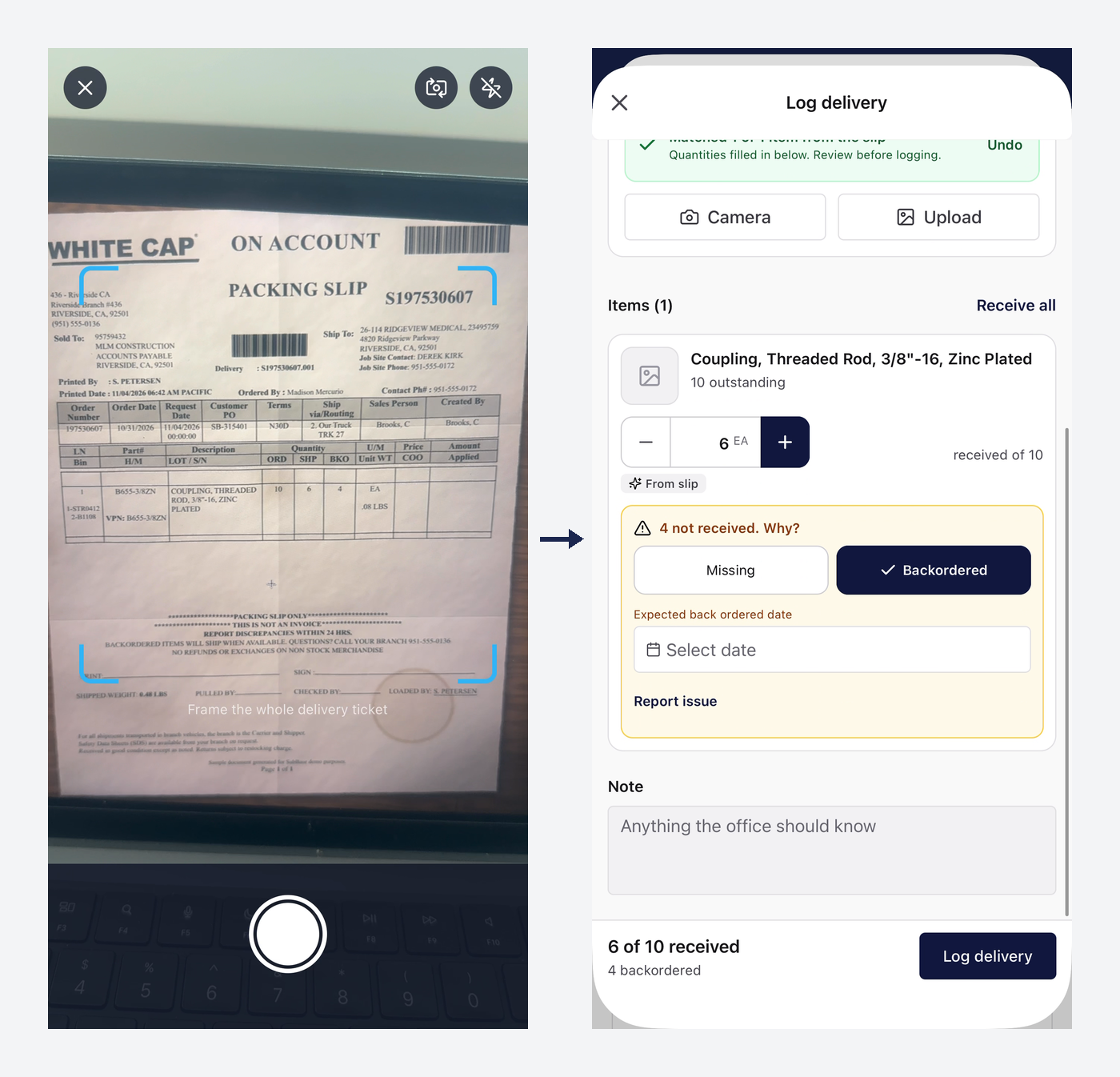
- Backorders stay open on the line item until they arrive.
- SubBase tracks each vendor's on-time performance against both the requested and promised dates, so the team has real numbers for future procurement decisions.
The result is real-time construction procurement visibility without anyone re-keying a confirmation into a spreadsheet.
What's the moment you see a contractor realize their spreadsheet can't keep up? Is it a missed delivery, an invoice, or something else?
“It's when the team realizes they have no clear picture of what's been ordered, what's been delivered, and what's still outstanding across multiple jobs. The breaking point often comes when an invoice arrives and doesn't match what the team thought they ordered or received. That's when they realize the spreadsheet isn't just falling behind; it's creating blind spots that cost them time, money, and control.” - Eric Helitzer, LEED AP
See SubBase running on a real job. Book a demo.
Frequently asked questions
What is a typical construction schedule?
A typical construction schedule is a critical path method (CPM) schedule that lists every activity, how long each takes, and which activities depend on others. Trade contractors take their need-on-site dates from it.
How do you create a procurement plan?
Create a procurement plan by defining what the company will buy, how it will buy it, and who approves each step, including preferred and alternative suppliers and how supplier performance gets reviewed. The procurement schedule then puts dates on that plan.
What is a procurement cycle in the construction procurement process?
A procurement cycle is the sequence every purchase moves through: identify the need, request pricing, select a vendor, issue the purchase order, receive the delivery, reconcile the invoice, and pay. On a construction project, it repeats for every release, so a commodity item can run through it dozens of times. That repetition is why construction material procurement gets expensive when any step in the cycle still runs on phone calls and spreadsheets.
What is a three-week lookahead schedule?
A three-week lookahead is a short-range schedule, usually built by the superintendent and updated weekly, that shows the next three weeks of work in more detail than the master schedule. It's the most reliable source of near-term need-on-site dates for release-based buys.
SubBase replaces the spreadsheet version of a construction procurement schedule template with one record the whole team works from.
Want to see what your material spend actually looks like? Let's talk.


Stay in touch
Sign up for our monthly newsletter to receive exclusive company updates, learn about industry trends and find out where we will be next. Don't miss out – subscribe today!

